Posts

Showing posts with the label Android App Update

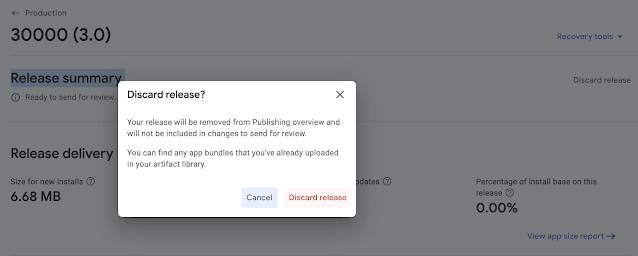
HOW TO DISCARD UNDER REVIEW APP BUNDLE AND UPLOAD NEW APP BUNDLE
Image
Google PlayConsole: Releases that have not yet been sent for review can now be discarded by managing your release. To discard releases already in review, or ready to be published, first remove changes on Publishing overview. Steps to discard changes 1) Publishing Overview => Remove Changes for Review 2) Publishing overview => Production => Release summary => Discard Release

Code to Update App Automatically From Google PlayStore

  To prompt users to download App automatically from Google PlayStore as soon as an App update is available, use following code: In build.gradle (App Level) file, Add, implementation 'com.google.android.play:app-update:2.1.0' Sync Project Next add in you MainActivity Class( or any Activity that comes after SplashActivity, where I prefer to put this code) Add the following code private static final int REQUEST_CODE_UPDATE = 123; private AppUpdateManager appUpdateManager; Now inside  onCreate() Method, add the following code appUpdateManager = AppUpdateManagerFactory. create (this); appUpdateManager.getAppUpdateInfo().addOnSuccessListener(appUpdateInfo -> {     if (appUpdateInfo.updateAvailability() == UpdateAvailability. UPDATE_AVAILABLE             && appUpdateInfo.isUpdateTypeAllowed(AppUpdateType. FLEXIBLE )) {         try {             appUpdateManager.startUpdateFlowForResu...

App Update Request for Android App :: Check Google PlayStore for Updated Version - Download - Install Update

App Update Request for Android App :: Check Google PlayStore for Updated Version - Download - Install Update. OK. Google has made this task easy for us. Here goes the steps: 1) Add this line of code in build.gradle file implementation 'com.google.android.play:core:1.12.0' 2) Inside onCreate Method, write appUpdateManager = AppUpdateManagerFactory . create ( this ); appUpdateManager .getAppUpdateInfo().addOnSuccessListener(appUpdateInfo -> { if (appUpdateInfo.updateAvailability() == UpdateAvailability . UPDATE_AVAILABLE && appUpdateInfo.isUpdateTypeAllowed( AppUpdateType . FLEXIBLE )) { try { appUpdateManager .startUpdateFlowForResult( appUpdateInfo, AppUpdateType . FLEXIBLE , this , REQUEST_CODE_UPDATE ); } catch ( Exception e) { e.printStackTrace(); } } }); 3) Now add following methods @Override protected void on...